VisiFair explained in detail: The guide
General
VisiFair is Messe Stuttgart's new digital logistics tool. The system balances out logistics traffic during set-up and dismantling. Using the online booking platform, you can book a time slot for your truck in advance. The advantage: with the system you have more planning security and can prevent unforeseen traffic around the grounds of Messe Stuttgart!
Please note that access to the trade fair grounds for set-up and dismantling is now only possible with the fee-based registration and booking of a loading zone via VisiFair.
If you have any questions about VisiFair, please contact:
Telephone: +49 711 939 64382*
E-mail: support(at)ms.visifair.com
*(Monday to Friday from 09.00 to 17.00)
For general information about on-site logistics, please call the Central Security Office (Hauptwache): +049 711 18560 3500
Registration
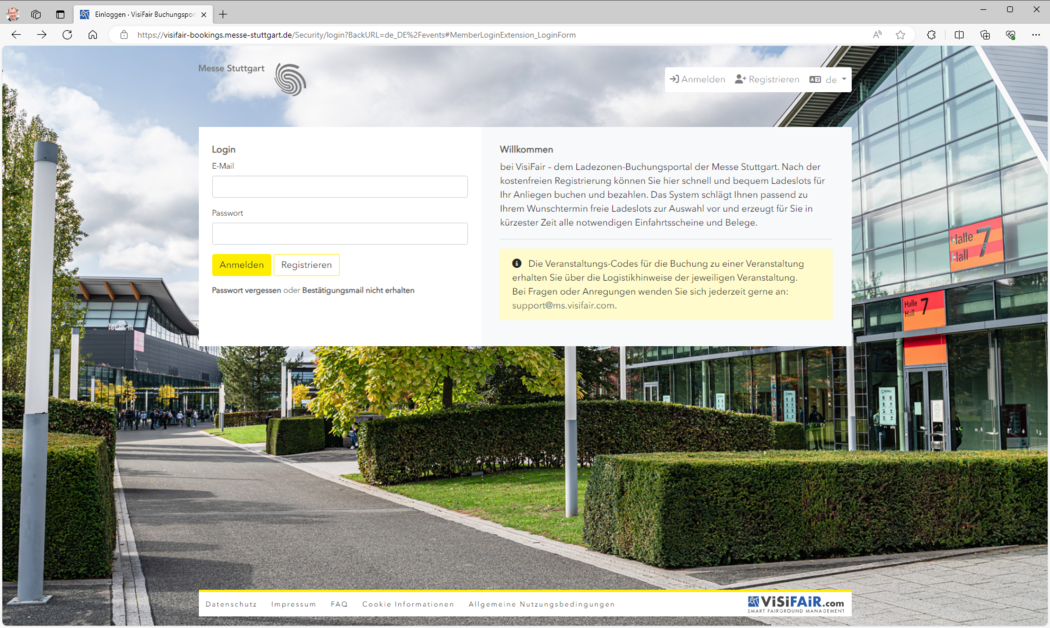
To book a free time slot, you need to register on the following website:
visifair-bookings.messe-stuttgart.de
To register, please provide your company address, an email address, a password, and a mobile phone number. When you register, a company profile is created at the same time. If the company already exists, you can request to join it. The request will then be sent to the company admin, who can approve it.
Within the company management, there are different roles. Admins manage the company, can approve join requests, view invoices and bookings, and edit the company’s address data. The Accounting role can view invoices issued through the company. Members can view their own bookings and—after their join request has been approved—the company’s bookings, but they cannot modify company data.
After successful registration, you will receive a confirmation email. Using the email address and password you provided, you can log in to VisiFair.
Alternatively, you can make a guest booking. In this case, you will also need to provide all the required information. Afterwards, you will receive a code at the email address you specified. Using this code, you can access the verification page and book an available time slot there.
Costs and booking process
VisiFair gives you all the information at a glance. The system stores the set-up and dismantling times of the respective event as well as the available loading zones.
To book a slot, please select the vehicle category.
Prices fpr Trade Fairs
| Vehicle categories | Slot duration / maximum length of stay | |
| Set-up and Dismantling | Price | |
| Load and Drive, continuously available (up to 12 m max.) | 30 minutes | € 0,00 |
| Cars (up to 6 m length) | 1 hour | € 15.00 |
| Commercial vehicles short (up to 8 m length) | 2 hours | € 15.00 |
| Commercial vehicles medium (up to 12 m length) | 2 hours | € 30.00 |
| Commercial vehicles long (max. 20 m length) | 3 hours | € 45.00 |
Prices for Public Fairs
| Vehicle categories | Slot duration / maximum length of stay | |
| Set-up and Dismantling | Price | |
| Load and Drive, continuously available (up to 12 m max.) | 30 minutes | € 0,00 |
| Cars (up to 6 m length) | 1 hour | € 10.00 |
| Commercial vehicles short (up to 8 m length) | 2 hours | € 10,00 |
| Commercial vehicles medium (up to 12 m length) | 2 hours | € 20.00 |
| Commercial vehicles long (max. 20 m length) | 3 hours | € 20.00 |
All prices quoted are subject to the statutory VAT valid at this time (according to the relevant version of the Value Added Tax Act)
Prices as of Nov 2023 (Subject to change)
Please provide the following information when booking:
- Official number plate of the vehicle
- The driver's mobile phone number
- The driver's language (10 languages available)
- Exhibition hall(s)
- Logistics service requested (yes/no),
if yes, the logistics service must be explicitly booked with service partner Schenker Deutschland AG via the service portal - Desired date and time
VisiFair offers the advantage of digital control of the capacities available in the loading bays and time windows (slots). This means: You will receive the desired slot if free areas are available. This procedure will prevent long waiting times and heavy traffic around the trade fair grounds on set-up and dismantling days.
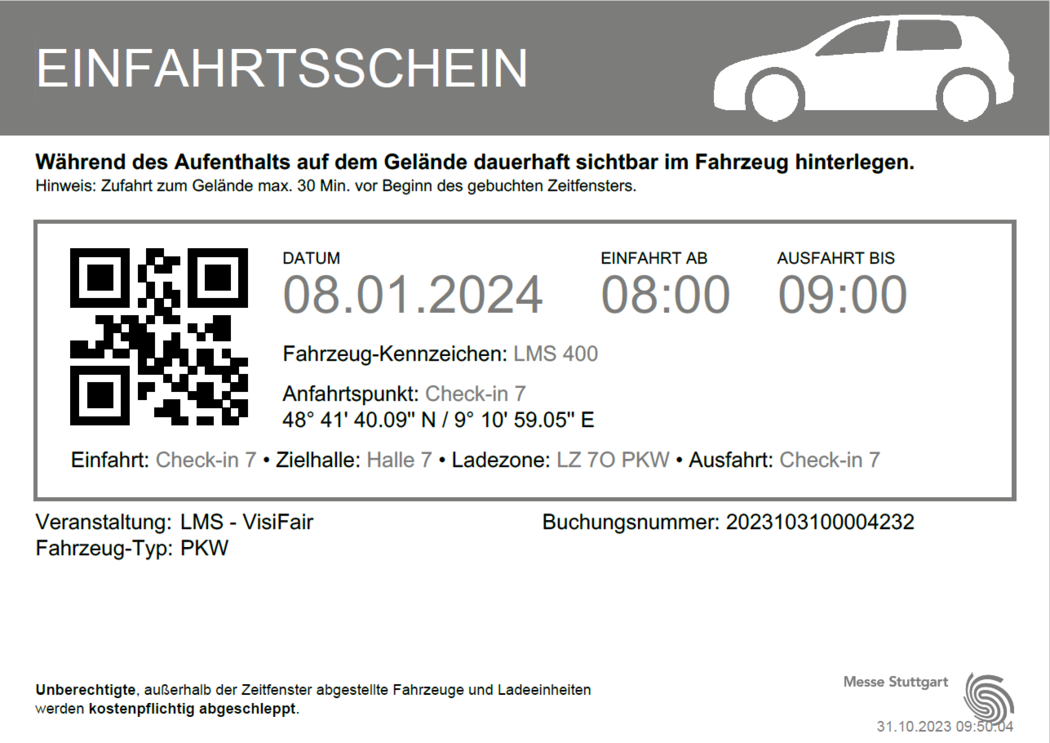
After a successful booking, you will receive the entry permit. This permit displays all booking details and includes both the QR code required for entry and directions to the booked loading zone.
VisiFair offers flexibility in the booking process. The booking can be made without providing driver details or the vehicle’s license plate number. In such cases, the system generates a reservation slip, which can be updated later once all required information is available.
If you have been provided with a logistics code by the exhibitor, you can enter it during the booking process. The logistics code is booked by the exhibitor via Messe Stuttgart’s SMS portal and allows the slot payment to be transferred to the exhibitor. In this case, the invoice is automatically issued to the exhibitor, and no direct payment by the person making the booking in VisiFair is required.
Payment process
In VisiFair, payment can be made using Visa, Mastercard, and American Express (AMEX) credit cards, as well as PayPal, instant bank transfer (Sofortüberweisung), Apple Pay, and Google Pay.
Entry and exit
The entry ticket, in digital or in paper form, must be shown for entry and exit of the premises.
- Entry
At GATE 2, a pre-registration (scan of the QR code) is carried out by the security personnel employed. Before entering the booked loading zone, the entry ticket is scanned again at the TLP (separation loading zone parking lot). This scan starts the loading or unloading time assigned to the vehicle. - Exit
15 minutes before the end of the booked time slot, the system sends a reminder text message to the stored mobile phone number, with a request to leave the loading zone in time. When leaving the loading zone, the entry ticket is scanned again. This completes the loading and unloading process. The exit from the trade fair grounds is via GATE 1. - Re-entry into the loading zone
After the booked time has expired, a re-booking is required for each entry and exit.
Parking after loading or unloading
After leaving the respective loading zone, free parking spaces on lots P30 to P32 are available for interim parking within the trade fair grounds, depending on the event schedule. Please note that the availability of these parking areas depends on the specific event, and not all parking spaces are available at all times.
The truck pool in front of GATE 1 and GATE 2 is not available for parking during setup and dismantling periods. For truck parking during the event, please contact the staff at the main security gate.
Changes / Cancellations
Each booking can be changed free of charge—subject to availability—up until the start of the booked time slot. If a booked time slot is not used, no refund will be issued and the slot will expire.
To reschedule or modify a time slot, please log in to the VisiFair platform and open your bookings. All existing bookings will be displayed there. Select the booking you wish to change and click the “Reschedule” button.
A menu will then open, allowing you to select a different hall and/or a new time period if applicable. Once confirmed, the entry permit or reservation slip will be automatically updated with the new booking details.